
Digital learning materials and online testing are now the norm in schools, and a growing number are examining how to incorporate generative artificial intelligence into instruction and school operations.
But a rising tide of parents, educators, and even students are souring on the ubiquitous presence of technology in schools, citing concerns that the overreliance on digital technologies could be partly to blame for rising student behavioral and mental health problems, as well as declines in academic achievement.
Some districts and state lawmakers are trying to find ways to address those concerns.
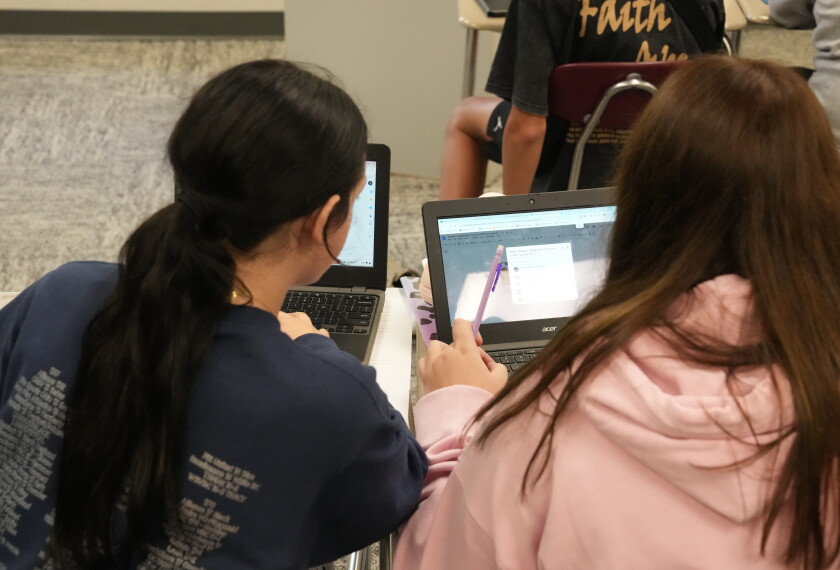
The Canon-McMillan school district in Pennsylvania is among those scaling back students’ classroom screen time. Students in grades K-2 won’t have regular access to school-issued laptops or tablets, students in grades 3-8 will have limited access through Chromebook carts, but high school students will continue to have their own school-issued devices to use in class and take home.
Education Week recently interviewed Greg Taranto, the superintendent of the 5,400-student district near Pittsburgh, about the decision to scale back classroom screen time.
This interview has been edited for length and clarity.
How did the district come to this decision?
We’ve been moving in this direction. We’ve been purchasing hard copy textbooks, hard copy workbooks. We’re emphasizing pencil and paper. It’s all in line with understanding what the literature is saying and what the research is saying: Kids learn best when they are looking at things on actual paper, not on a forever-scrolling space.
We’ve [emphasized] hard copy for a number of years. When we’re looking at new curricular materials, one of the first things we ask is: Do you have hard copy workbooks and textbooks? If the answer is no, we don’t look at that resource.

We were minimal with digital devices in kindergarten and 1st grade. There was some increased usage starting in 2nd grade. We wanted to make a definitive stamp on K-2. We are maximizing human-to-human interaction, teacher-to-student, student-to-teacher. If you look at the research, it says the number one in-school determining factor for student achievement is the teacher. So why are we doing things to take the student away from the teacher? We need to be doing things that maximize that time.
We’re also reducing screen time for grades 3-12.
What will that look like in grades 3-12?
We are actually not a 1-to-1 [computing environment] until 9th grade. That will continue, with a de-emphasis on those Chromebooks being used in the classroom. In grades 3-8, they’ll have Chromebook carts. They’ll have access to the Chromebooks if a teacher needs the students to have access, but they do not take those devices home at all. And by reducing the use of some learning programs, that’s going to cut back on screen time.
This is more of a rebalancing at the upper grades. Our core subject teachers do not heavily rely on Chromebooks. You will see them used for typing an essay, researching, running science simulations or looking up information via their learning management system. We do not see that changing at this point. However, we will continue to issue academic resources as textbooks and workbooks instead of through digital delivery. That in itself reduces the time looking at a screen.
Did this decision stem from feedback from parents and other community members?
It’s from a district leadership point of view—following the research, following the literature. I used to be the first to say, “Hey, let’s put tech in kids’ hands from the get go.”
But in the same way we want our kids to have a growth mindset, us adults, we have to have a growth mindset. So, as information presents itself and research presents itself, we have to pivot and adjust to that information so we are providing the best learning experience for our kids.
It’s in lockstep, fortunately, with our parents. Our parents are fully on board. We have a super supportive school board. They’re learning with us, information-sharing articles, presentations. And our admin team and our teachers are supportive, as well.

Have you had any negative feedback about this?
No, surprisingly. No matter what decision I make, I usually get some kind of feedback one way or the other. This decision, I’ve not heard anything counter to it. It’s all been 100% positive.
What I want to emphasize is we’re swinging the pendulum back to center. This is not a ban. This is not like you’re not going to see technology in our schools: Let’s use this a reasonable amount. Let’s use it as a tool instead of using it as the learning delivery.
We want kids to understand how to go through the writing process and actually write an essay, so they’re going to do that by hand. But then if they have to type it, because they learn how to type, then they’re going to have those tools.
What we’re saying is, we don’t want kids sitting in front of Chromebooks 30 minutes at a time, an hour at a time, when they could be learning from the teacher, learning from each other.
What do your technology education classes look like?
In 5th to 8th grades, they have tech ed. every year. In 5th grade, we have some really neat things with AI robotics we’re doing, so they get a nice exposure. In grades 7 and 8, they cover everything from programming, computer-aided design, bridge design, traditional woodshop class—all aspects of tech ed.
We have some partnerships occurring in 8th grade and in high school with Carnegie Mellon University with some advanced programming classes that we offer to our kids. We want to make sure our students are prepared to use this technology. That’s where it’s best suited in our mind.
How will the district measure the effect of this decision to move in a low-tech direction?
We’re going to be in classrooms. You go in, you see how things are working. We’re not going to have any formal measurement, but we’ll keep a pulse of it with our staff, our teachers, our parents, and we’ll adjust as necessary.
One challenge is this past year Pennsylvania mandated online testing, which forced the kids to take their state exams on the Chromebook. We would like to see Pennsylvania rethink that and go back to the option of paper and pencil because we know you process better using paper and pencil.

Do you expect some cost savings?
There should be some kind of cost savings. At some point, when we get to the refresh point of buying Chromebooks, we’ll be buying less for sure. But there is that added cost of buying hard copy textbooks. Those are a little more expensive—not that much more expensive—than digital versions. We’ve been taking on the burden of that added cost. I anticipate things pretty much leveling out. Cost was not part of this decision at all, but will there be some savings potentially? Yeah, which is always nice.
Do you have advice for other district leaders?
Make sure their tech ed.'s established and they have a good tech ed. program.
If they jumped all in on ed tech, and they have 1-to-1 [computing] starting in kindergarten or 1st grade, and they went all digital with the resources, there is a financial challenge for these districts. My recommendation is to understand the literature, educate yourself, say, “OK, nothing is supporting going this heavy in tech,” and then say, “OK, where can we start? Let’s take a small step in this direction.”
For example, if our cycle for purchasing math instructional materials is up, instead of going digital, look at traditional textbooks and hard workbook copies. Start out with that subject area. We can’t go back to all textbooks in one year, but we can do it as our cycle moves on. Put a plan in place to show parents and a community we are moving in that direction, and this is how we’re doing it.